
Web design for small businesses: 7 mistakes that stop your website generating customers
If you have a website but it does not generate quote requests or enquiries, the cause is probably several smaller web design issues rather than one major mistake. In this article, I explain seven of the most common reasons a website fails to convert.
In brief: if your site looks good but does not generate enquiries, the issue usually is not the “design” alone but the user journey, trust-building and clear calls to action.
Web design for small businesses: what should you focus on?
For any business website — whether it represents an emerging brand, a small business or a company going through a refresh — the goal is not to fill the page with eye-catching elements. Visitors should quickly understand the offer, trust the brand and find it easy to get in touch.
Effective web design brings together the brand identity, written content, visual hierarchy and contact journey into one coherent system. This matters equally for small businesses, medium-sized companies and growing firms.
If your core brand identity is not yet consistent, it is worth thinking through the visual foundations first, because the website will be built on that system.
What is effective web design, and why do so many websites underperform?
Effective web design is an approach that optimises not only appearance but also user experience, navigation and conversions. Its goal is simple: visitors should quickly understand what you do, why they can trust you and how to get in touch with you.

Why do so many websites fail to attract customers?
In my experience, the same patterns recur in many underperforming websites:
- An unclear offer (what do you help with, and whom do you help?)
- No clear focus (too many messages, too many menu items, a disjointed page)
- Lack of trust (no portfolio, references, process, guarantees or human presence)
- Missing calls to action (no obvious next step, or the button is in the wrong place)
- Slow loading and an awkward mobile experience
The good news is that these issues can be fixed. Web design is not merely an art project; it is a business tool — and that should be the starting point for planning.
7 common web design mistakes – and how to fix them
A website needs to do more than look good: visitors must be able to find what they came for. Below are seven common mistakes, why they matter and what you can do differently.
1. Visitors cannot tell where to go next
The mistake: complex menus, scattered content and no obvious next step make it hard for first-time visitors to find their way.
How to fix it: help visitors find what they are looking for without having to guess. Focus on:
- Logical menus and clear navigation
- Easy-to-understand content hierarchy
- Calls to action that are immediately visible
If using the site is frustrating, even an impressive design will not be effective.
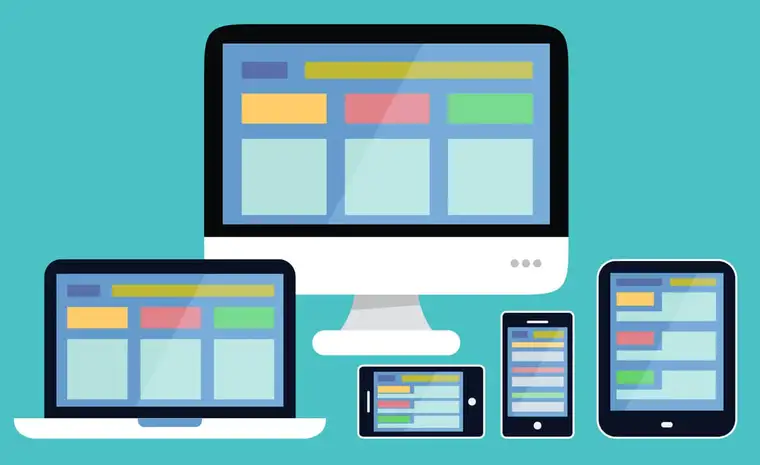
2. The website is frustrating to use on mobile
The mistake: tiny buttons, crowded navigation or content that spills off the screen make simple tasks unnecessarily difficult.
How to fix it: design the mobile journey instead of merely shrinking the desktop layout. Start with:
- Flexible grid-based layouts
- Optimised images (WebP, correctly sized)
- Simplified mobile navigation
- Touch-friendly buttons (with adequately sized tap targets)
3. Everything competes for attention
The mistake: too many oversized headings, bright colours and competing buttons leave visitors unsure where to look first.
How to fix it: use colour, typography and layout to guide attention deliberately:
- One main message per section (not “everything is important”)
- White space for readability
- High-contrast, consistent call-to-action buttons
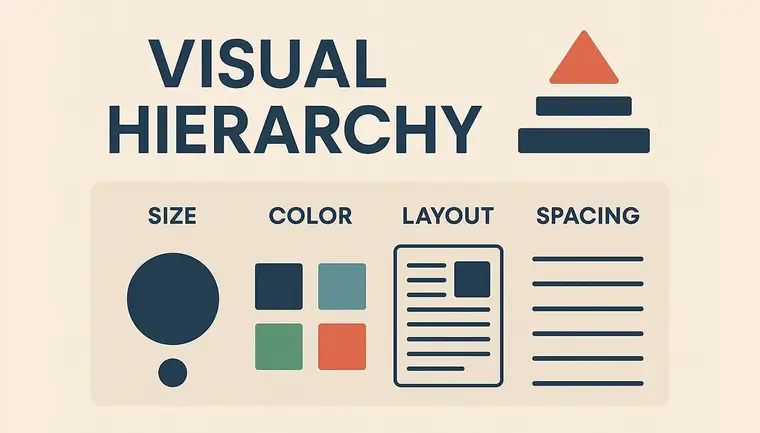
Colours and highlights are also part of this hierarchy: a good call to action does not work by being loud, but by guiding attention consistently. I explain this further in the article on colour psychology and brand colours.
4. Slow loading and shifting page elements
The mistake: oversized images and unnecessary scripts slow the page down, while elements that move unexpectedly can cause misclicks.
How to fix it: treat performance as part of the user experience, not a separate technical afterthought:
- Optimised images and media files
- Minified CSS and JavaScript
- Cache and compression (GZIP/Brotli)
A slow website loses visitors even if its appearance is perfect.
5. There is little evidence that visitors should trust you
The mistake: generic claims about quality are not backed up by relevant work, an explanation of the process or a clear picture of who is behind the business.
How to fix it: give people tangible reasons to feel confident about their decision:
- A portfolio and concrete examples (see my work)
- A short process overview (what happens between enquiry and handover)
- Easy-to-find contact details (email/phone)
- A human face and professional credibility (who builds the site and how they work)
Trust-building does not start with the website alone. If the logo, colour palette, typography and imagery do not work together, the website will be less convincing too. For a related guide, read the guide to the brand identity design process.
If several of these problems appear on an existing site at once, the key signs that it is time for a website redesign may help you decide when targeted fixes are sufficient and when a more substantial redesign makes sense.
6. The offer is vague or difficult to understand
The mistake: phrases such as “quality and reliability” do not explain who the service is for, what problem it solves or why it matters. Long, unstructured paragraphs make the message harder to follow.
How to fix it: explain the audience, benefit and next step on the first screen, then break the supporting information into clear sections.
- Short, clear paragraphs
- Well-structured sections (H2/H3), lists and quick answers
- Make the offer or service clear within the first 10 seconds
7. There is no clear way to get in touch
The mistake: the contact button is buried in the footer or the form asks for too much information. Even an interested visitor may give up.
How to fix it: place calls to action where visitors are ready to take the next step. A well-timed button can do more than another decorative element.
- Place a call to action above the fold, beside the main message
- Include another call to action around the middle and end of the article
- Use specific button labels: “Request a quote”, “Free consultation”
Want a website that brings you customers?
Get in touch, and I will send you a clear, concise suggestion for making your website more effective for your business.
Web design in practice: two projects, two different user journeys
Visitors make different decisions on an apartment website and an online shop. Instead of applying the same design formula to both, I look for the points where people might struggle to find information or take the next step.
- Flat Margaret – apartment website: mobile navigation, accommodation photos, booking calls to action and practical information need to work together. The redesign included improvements to mobile layouts, the gallery and the route towards an enquiry. See the Flat Margaret case study.
- Office Art & Design – Shopify store: shoppers need to understand products, options and buying information quickly. Refining mobile product pages, navigation and the journey to the cart requires a different kind of UX thinking. I explain more in the Office Art Shopify case study.
The takeaway: good web design supports a decision. Visual polish matters, but it works best when visitors can easily find what they came for. That is why my website development service covers site structure and mobile usability as well as the visual design.
Quick checklist (2 minutes)
- Does the first screen make it clear what you do and whom you help?
- Is there an obvious CTA (call to action for a quote or contact)?
- Is it comfortable to use on mobile (menu, buttons and readability)?
- Does it build trust (portfolio, process and references)?
- Does it load smoothly, without buttons or text unexpectedly shifting position?
What should you fix first?
You do not need to rebuild everything at once. Follow the visitor journey and start where people are most likely to get stuck.
- Clarity: make the offer, main message and navigation easy to understand.
- Usability: test the mobile menu, key pages and contact journey from start to finish.
- Trust and performance: add context to your case studies and address slow or unstable elements.
If the site is an online store rather than a brochure website, category pages, product pages and checkout structure are also essential to conversion. Read the article on online store structure for more guidance and see these principles applied in my Shopify store case study.
FAQ
Web design for small businesses: what is different?
A small business website needs a quickly understandable offer, trust-building elements and a simple contact journey. The aim is not an abundance of visual effects, but a clear experience that supports visitors' decisions.
How long does it take to build a website?
That depends on the content and number of pages. A clean brochure site is quicker to build; a more complex structure requires more discussion and planning.
What is the difference between a “pretty” and an “effective” website?
An effective website does more than look good: it helps people make decisions, builds trust and guides visitors towards the next step.
Is being mobile-friendly enough?
Mobile usability is the foundation. A site also needs focus, good content, trust signals and calls to action — these work together to generate conversions.
Summary
Effective web design is based on a balance of appearance and functionality. A user-centred, fast, responsive and trust-building website does not just look better; it also supports business performance.
If you want a website that attracts customers as well as looking good, get in touch.
Planning a website?
The checklist helps you identify what content, images, brand assets and trust-building elements you may need before commissioning a website.